Google’s WebMCP Turns Every Website Into a Tool for AI Agents. Here’s What It Means for Commerce.
Google just shipped WebMCP in Chrome — a new protocol that lets websites expose structured actions directly to AI agents. No more scraping. No more guessing. An AI agent can now call searchProducts() or checkout() like an API. This is the biggest infrastructure shift for agentic commerce since UCP.
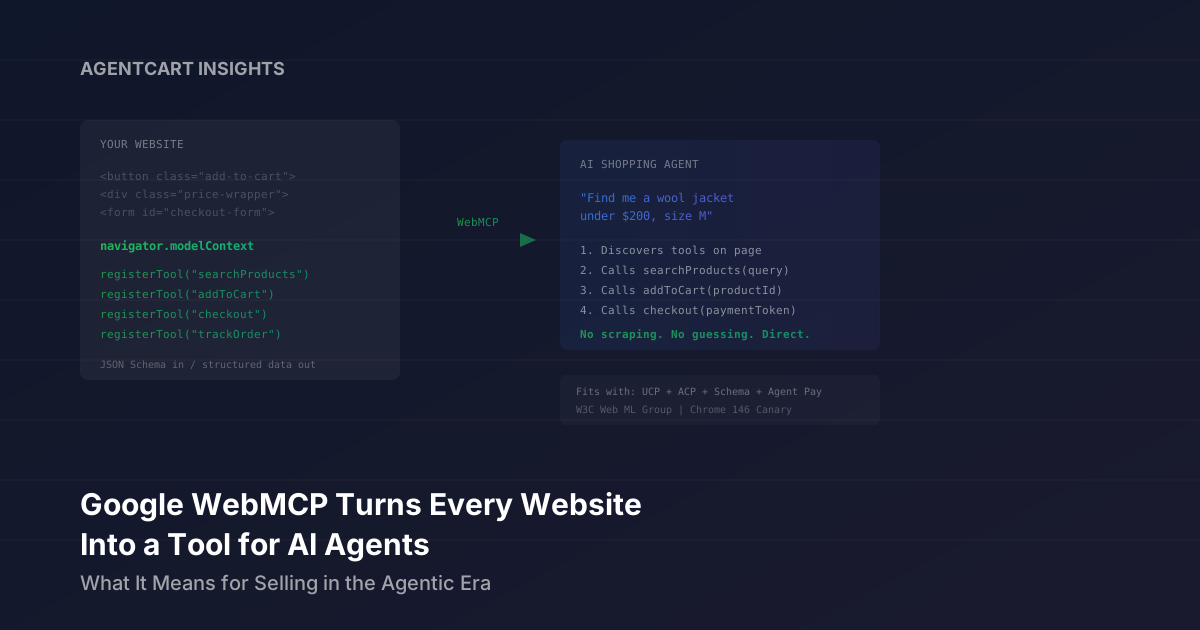
For the past year, AI shopping agents have interacted with websites the way a toddler interacts with a vending machine — pressing buttons, hoping for the right outcome, and occasionally getting stuck. When ChatGPT or Gemini needs to find a product on your site, it scrapes HTML, parses DOM elements, and simulates clicks. It’s slow, fragile, and breaks every time you redesign a page.
Google just proposed a fix. WebMCP (Web Model Context Protocol), now available in early preview in Chrome 146 Canary, lets websites expose structured “tools” that AI agents can call directly. Instead of an agent trying to figure out which button is “Add to Cart,” your site tells the agent: here’s a function called addToCart(productId, size, quantity), here’s the schema, call it.
One SEO expert called it “the biggest shift in technical SEO since structured data.” For ecommerce, it might be bigger than that.
The Problem: AI Agents Are Terrible at Using Websites
Today’s AI agents interact with the web through two approaches, and both are bad:
Visual processing — The agent takes continuous screenshots and tries to identify buttons, forms, and links from the pixels. This burns tokens, requires constant re-analysis, and fails on anything non-standard.
DOM scraping — The agent parses raw HTML, hunting for elements like <button class="add-to-cart__btn--v2">. This works until the site updates its CSS class names, swaps to a new checkout component, or loads content dynamically via JavaScript.
According to Google’s own analysis, WebMCP reduces computational overhead by 67% compared to visual-based agents. But the real gain isn’t efficiency — it’s reliability. When an agent calls a defined function with a typed schema, it works every time. When it guesses which DOM element to click, it works until it doesn’t.
How WebMCP Works
WebMCP introduces a new browser API — navigator.modelContext — that lets websites register tools AI agents can discover and call. It operates in three steps:
1. Discovery
When an AI agent lands on a page, it asks: what tools does this page support? The site responds with a structured list — searchProducts, addToCart, checkout, trackOrder — each with a description, input schema, and output schema.
2. Invocation
The agent calls the function directly, passing structured parameters. No form filling. No click simulation. The site executes the function and returns structured data.
3. State Management
Tools can register and unregister based on page state. A checkout tool only appears when items are in the cart. A trackOrder tool only appears after a purchase. The agent always sees only the actions that are currently valid.
There are two ways to implement this:
| API | How It Works | Best For |
|---|---|---|
| Declarative | Standard HTML forms with added attributes like toolname and tooldescription. The browser auto-translates form fields into schemas. | Simple actions: newsletter signups, search forms, contact forms |
| Imperative | JavaScript registers tools via navigator.modelContext.registerTool() with full input/output schemas and handler functions. | Complex flows: product configuration, multi-step checkout, dynamic filtering |
The Imperative API is where it gets interesting for commerce. A merchant can register a searchProducts tool that accepts natural language queries, filter parameters, and price ranges — and returns structured product data with IDs, prices, images, and availability. The agent doesn’t need to figure out how your search works. You tell it.
What This Looks Like for Ecommerce
Imagine a shopper tells their AI agent: “Find me a wool jacket under $200 in size medium.”
Today, the agent navigates to your site, tries to find the search bar, types a query, attempts to apply filters, scrolls through results, and hopes the page renders correctly. If your site uses client-side rendering, infinite scroll, or a custom filter component, the agent may fail entirely.
With WebMCP, the agent lands on your site, discovers a searchProducts tool, calls it with {query: "wool jacket", maxPrice: 200, size: "M"}, and gets back a JSON array of matching products with structured data. Then it calls addToCart(productId) and checkout(paymentToken). Each step is a clean function call with a predictable response.
The PYMNTS analysis highlighted a pharmacy use case: a chain could expose tools like “find prescription,” “check nearby stock,” “schedule pickup,” and “submit insurance info” — letting AI assistants help with refills without giving bots full access to account pages. The same logic applies to any merchant: you decide which capabilities are exposed and which aren’t.
WebMCP vs. Everything Else
If you’ve been following the agentic commerce space, you might be wondering: don’t we already have protocols for this? We do. WebMCP doesn’t replace them — it fills a gap none of them addressed.
| Protocol | What It Does | How It Works |
|---|---|---|
| Schema.org | Tells agents what your products are | Structured data embedded in HTML |
| Google UCP | Declares your store’s commerce capabilities | JSON manifest at /.well-known/ucp |
| OpenAI ACP | Feeds product data to ChatGPT Shopping | Product feed consumed by OpenAI |
| MCP (Anthropic) | Connects AI to backend services | Server-to-server integration |
| Mastercard Agent Pay | Authenticates agent payments | Tokenized credentials on card rails |
| WebMCP | Lets agents use your website directly | Browser-side tool registration via JS |
The key distinction: every protocol above operates at the data or infrastructure level. Schema tells agents about your products. UCP declares your capabilities. ACP feeds data to specific platforms. Agent Pay handles the payment.
WebMCP operates at the interaction level. It doesn’t tell the agent what your products are — it lets the agent do things on your site. Search. Filter. Add to cart. Configure. Check out. Track an order. Request a refund. These are actions, not data.
And critically, WebMCP works with your existing website. Unlike Anthropic’s MCP, which requires backend server integration, WebMCP runs client-side in the browser. You’re exposing your existing site functionality as structured tools, not building a separate API.
Why This Matters More Than It Looks
Here’s the shift that WebMCP represents: being discoverable by humans is no longer sufficient. Your site also needs to be usable by AI.
Until now, the agentic commerce conversation has been about discoverability — can AI agents find your products? Do you have Schema markup? Is your data in the right feeds? Can crawlers access your site?
WebMCP adds a new dimension: can AI agents actually do things on your site once they get there?
This is the difference between a store that an AI agent can describe and a store that an AI agent can sell from. And the economics are straightforward: if an agent can complete a purchase on Site A with a single function call but has to fight through DOM scraping on Site B, it will favor Site A every time. Agents optimize for reliability, and WebMCP makes your site the reliable option.
The Attribution Opportunity
There’s a less obvious benefit that could matter just as much. Today, when an AI agent drives traffic to your site, it’s nearly invisible in your analytics. The agent scrapes and clicks like a human, so the visit looks like organic traffic. You have no idea which purchases were agent-initiated.
With WebMCP, every agent interaction goes through your registered tools. That means you can measure it. You can see which tools agents call most often, which queries they run, which products they add to cart, and which flows convert. For the first time, merchants could have a real analytics layer for AI agent activity.
As PYMNTS noted: “Companies could better identify agent-originated transactions and measure their performance. That data may influence pricing models, partnerships and marketing strategies.”
The Security Model
A natural concern: if you expose tools to AI agents, what stops bad actors from abusing them?
WebMCP’s security design is user-centric. Chrome acts as a mediator — the browser requires explicit user approval before sensitive operations execute. Websites opt in by registering tools; agents can’t commandeer capabilities that haven’t been exposed. And because tools are scoped to page state, an agent can’t call checkout if the cart is empty or access trackOrder without a valid purchase.
For merchants, this means you’re in control. You decide which actions are available, what inputs they accept, and what data comes back. It’s the opposite of scraping, where bots take whatever they can parse.
Where This Stands Today
WebMCP is early. It’s available in Chrome 146 Canary behind a test flag (chrome://flags/#enable-webmcp-testing). Google is developing it with Microsoft and incubating it through the W3C Web Machine Learning community group — a signal that they’re aiming for a cross-browser standard, not a Chrome-only feature.
The spec is not production-ready. There are no code examples in the public documentation yet (those are behind the Chrome Early Preview Program). Industry observers expect formal announcements at Google I/O or Google Cloud Next later this year.
But the direction is clear. The same Google that shipped UCP for commerce capabilities and A2A for agent-to-agent communication is now shipping the browser-level interaction layer. The pieces are converging.
What Merchants Should Do Now
You don’t need to implement WebMCP today — it’s not production-ready. But you should be thinking about what it implies:
1. Audit your site for agent usability
Walk through your core user flows — search, filter, product detail, add to cart, checkout — and ask: could these be expressed as structured function calls? If your checkout is a seven-step wizard with hidden fields and JavaScript validation, it’s going to be hard for any agent to use, WebMCP or not. Simpler flows will be easier to expose as tools.
2. Get the foundation layers right first
WebMCP is the interaction layer, but it doesn’t help if agents can’t find you in the first place. Make sure your Schema.org markup is comprehensive, your product data is structured, and AI crawlers can access your site. When we audited Shopify’s 50 Best Stores, the average readiness score was 70/100 — but the variation was enormous. The gap between brands that are ready and brands that aren’t is growing.
3. Think in tools, not pages
The mental model shift is subtle but important. Traditional web development thinks in pages and navigation flows. WebMCP thinks in actions and capabilities. Your site isn’t a collection of pages an agent browses — it’s a collection of tools an agent can invoke. Start inventorying your site’s core actions: what can a user do here, and what parameters does each action need?
The Full Picture
If you zoom out, the past few months have been remarkable. Google UCP handles discovery and commerce capabilities. OpenAI’s ACP handles product feeds and ChatGPT checkout. Mastercard Agent Pay handles secure payments. Cloudflare Markdown for Agents optimizes content delivery. And now WebMCP handles direct site interaction.
Each layer solves a different problem. Together, they form an infrastructure where an AI agent can discover your products, understand your capabilities, interact with your site, complete a purchase, and pay securely — all without the consumer ever opening a browser tab.
That future isn’t five years away. The protocols are shipping now. The question, as always, is whether your store is ready.
Run a free AI readiness scan to see how AI agents currently see your store — and what to fix before they can do more than just look.
Check your AI commerce readiness
Get your free score across Google UCP, ChatGPT Shopping, and Schema.org in under 30 seconds.
Run a free scan